No time to sit & read
Listen on the commute, in the gym, while cooking. Reclaim 40+ minutes a week of dead time.
ReadLens turns any photo of text (a textbook, a menu, a sign, a PDF) into a natural-voice audio reader, with every word lit up in sync so your brain stays locked in.
iPhone · iPad · Mac · Vision Pro · Android · No account needed
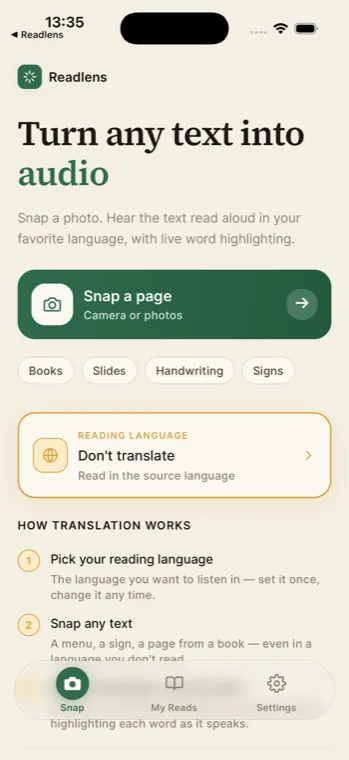
Live demo
Watch the highlight follow the voice.
Reading a page should feel effortless, not exhausting.
What is ReadLens?
ReadLens is a photo-to-speech app for iPhone, iPad, Mac (M1+), Apple Vision Pro and Android that turns any printed or on-screen text into a natural-voice audio reader. You point your camera at a page (a textbook, restaurant menu, road sign, slide, handwritten note, or PDF on screen) and ReadLens runs OCR on the image, optionally translates the text into one of 11 supported languages (English, Spanish, French, German, Italian, Portuguese, Japanese, Korean, Chinese, Arabic and Hindi), and plays the result back with a synced word-by-word highlight so your eyes and ears follow the same place on the page. The whole loop (snap, OCR, voice) typically finishes in under fifteen seconds. ReadLens is free to download on the App Store and Google Play, with weekly free snaps; a $5.99/week or $119.99/year Premium tier unlocks unlimited usage. Voices are generated by ElevenLabs and OpenAI. Built by Black Box Code LLC.
Made for readers who don't have time to read
Sound familiar?
The information you need is locked inside pages your eyes are too tired to read. Here's what ReadLens fixes, instantly.
Listen on the commute, in the gym, while cooking. Reclaim 40+ minutes a week of dead time.
Long texts make your eyes glaze over. Listening with words lit up keeps focus locked in.
Foreign menus, signs, slides? Point your camera. Hear it back in yours, across 11 languages.
Multi-sensory reading. The word-by-word highlight changes how dense text feels. Finally easy.
How does ReadLens work?
No setup. No account. Just snap → process → press play.
Camera or photo library. Book, menu, screenshot, even handwriting. Frame guides line up the page.
High-accuracy OCR turns pixels into clean text. Optional translation into 11 languages, before the voice begins.
A natural voice reads aloud. Every word lights up on cue. Tap any word to jump to it. Like karaoke for reading.
Inside the app
Warm paper background. Espresso ink. Gold-leaf highlight. Designed to feel like a study lamp on a page.

Capture
Corner guides line up the page so the OCR nails it the first time.
One screen
Pick your reading language once. Every snap shows up here, ready to listen.

Reader
Karaoke-style highlight. Tap any word to jump. Speed and font-size controls.
Built for real readers
Designed for long reading sessions: warm paper background, gentle motion, and zero junk between you and the page.
Each word lights up the instant it's spoken. Perfect for focus, study and accessibility.
English, Spanish, French, German, Italian, Portuguese, Japanese, Korean, Chinese, Arabic, Hindi.
Powered by ElevenLabs & OpenAI. Choose Natural (richer) or Faster (lighter) on the fly.
Every snap is saved: rename, revisit, listen again. No re-scanning. Works offline once loaded.
Designed for long reads: low-glare oat paper light theme, OLED-friendly dark theme.
Photos never leave your device until you snap. No accounts, no ad networks, no selling of data.
Free to start
Premium is optional. Only when you want unlimited. Start free, see if it fits.


Who it's for
Snap textbook pages and slides. Listen on the commute. Re-listen at 1.5×. Finals week, but easier.
Point your camera at a French menu, hear it in English. Confident orders, no more guessing.
Multi-sensory reading reduces cognitive load. The lit-up word locks attention where it belongs.
Long memos, contracts, reports: snap, drive, listen. Back from the gym already through it.
What makes ReadLens different?
Most TTS apps read at you. ReadLens reads with you, so your eyes stay on the page.
 ReadLens
Loved by readers
"I snap my chapter in the morning and listen to it on my way to class. Game-changer for finals week."
"First time I've ever 'read' a French menu. Pointed my camera, heard it in English, ordered with confidence."
"I have dyslexia and dense text was exhausting. The word-by-word highlight changed how I study. Finally calm."
How much does ReadLens cost?
No account. No credit card to start. Cancel anytime.
Try it. See it work. Decide later.
$0 / forever
Read without limits. No ads. Anywhere, anytime.
$119.99 / year
or $5.99/week · cancel anytime
Questions
ReadLens is an app for iPhone, iPad, Mac, Apple Vision Pro and Android that turns photos of any printed or on-screen text into clear spoken audio. As the voice reads, every word is highlighted in sync so your eyes and ears follow the same place on the page. Perfect for studying, accessibility, language learning, and listening hands-free.
11 languages: English, Spanish, French, German, Italian, Portuguese, Japanese, Korean, Chinese, Arabic, and Hindi. Snap text in one language, hear it in another, or turn translation off to stay in the source language.
Yes. ReadLens is free to download with weekly free snaps. Premium is optional and only unlocks unlimited snaps, unlimited translation and an ad-free experience ($5.99/week or $119.99/year). You can use it free as long as you like.
Yes. ReadLens works on books, slides, handouts, menus, signs, screenshots, PDFs, and clear handwriting. The OCR engine is tuned for printed text first and tolerates moderate handwriting.
iPhone, iPad, Mac with Apple Silicon (M1 or later) and Apple Vision Pro (iOS 15.1 or later), plus Android phones and tablets via Google Play.
Your photos never leave your device until you tap the shutter. The image is sent only to perform OCR and voice generation. No accounts, no ad networks, no selling data.
Who built ReadLens
I'm Mario Diaz, the developer behind ReadLens at Black Box Code LLC. Every part of the app (capture, OCR, translation, voice playback, and the cross-platform reading library) was designed and shipped by one person, with no team and no investors. I read every support email myself at [email protected] and ship updates from my own desk. If you have a bug, a feature wish, or want to talk about how you use ReadLens, the inbox is open.
Snap it. Hear it. Get back to your life. ReadLens is free on the App Store and Google Play. Most people are reading more by the end of the week.
Free · iOS & Android · No account needed